


Juz Amma (Suras of Quran)
4.9307.00 Reviews
App Specs
- Version
- Varies with Device
- Updated On
- License
- Free
- Downloads
- 1,000,000+
- Developer
- dimach.cassiope
- Categories
- Libraries & Demo
- Platform
- Android, iOS
Screenshots
 Analysis by AppCompare
I can see this fitting naturally into a shared household routine: one person might open it for a short reading, while another uses it to follow along with a recitation or revisit a passage. That kind of low-key, flexible use is where Juz Amma (Suras of Quran) makes the most sense to me. It focuses on a defined portion of the Quran rather than trying to become a general-purpose religious library, so it can be an approachable starting point for a family member who wants to explore these chapters.
A useful shared device, with sensible boundaries
On a tablet or phone that gets passed around, I’d treat the app as a shared reading resource, not as a personal account or a family-management tool. Each person can use it for their own reading, but shared bookmarks or settings may not reflect everyone’s preferences. If several people rely on the same device, it is worth agreeing on a simple routine: finish a session where you can find it again, and avoid assuming that a saved place belongs to a particular reader.
That small bit of coordination matters more than it might seem. A learner can use transliteration while a more confident reader follows the Arabic text, for example, but the app does not replace patient guidance from a teacher or family member. I’d use it to support a shared activity, then pause to discuss pronunciation or meaning when someone has a question. It works best as a convenient starting point rather than an authority that settles every interpretation.
Choosing it for the right kind of study
The focused scope is both its clearest strength and its main trade-off. If your goal is to spend time with Juz Amma and Surah Al-Fatiha, a dedicated app can feel more direct than a broad Quran platform crowded with many sections and tools. If you want a complete Quran library, structured lessons, or a broader collection of study resources, a different app or a printed edition may suit you better. I would choose this one for quick access to its particular material, not as an all-in-one study system.
It can also work well in short, ordinary moments: after breakfast, during a quiet break, or while waiting for an appointment. One practical approach is to pick a small reading goal before opening the app, then use search or a bookmark to return to a passage later. That keeps a brief session intentional instead of turning into aimless browsing. For pronunciation practice, listening first and then reading along can give a learner a clearer rhythm, though anyone studying carefully should still check details with a knowledgeable person.
What to expect from a free app
The app is free to download, with optional in-app purchases listed at $0.99 per item. It comes from dimach.cassiope and sits among library and reference-style apps rather than games or social tools. Its average rating is 4.9 from around 15,000 ratings, and it has been installed over a million times. Those figures suggest that many users find it useful, but I would still judge it by whether its limited subject area matches what you want to read.
For age context, the app is rated Everyone, which makes it reasonable to consider for a household device. I would still guide younger readers through the material and help them distinguish reading support from religious instruction. The rating is not a substitute for an adult’s judgment about a child’s needs, and a shared phone does not automatically make every person’s reading preferences private. If privacy between household members matters, use whatever device-level boundaries your family already relies on rather than assuming the app provides separate profiles.
Worth Reading Before You Choose

Flipboard Shows What News Apps Must Do Beyond the Feed

Switching to Android Auto Means Rethinking Your Driving Routine

Google Calendar Makes a Crowded Week Easier to Manage

Ludo King Makes the Most of the Minutes Between Plans

Baby Panda World Brings Quick Play to Modern Phones, but Its Game Library Feels Busy

ESPN’s Live Game View Makes Following Close Games Easier
Small habits that make it more useful
One helpful habit is to adjust the text size before a longer session instead of repeatedly changing it while reading. On a shared device, agree on a comfortable default or reset it when you finish, so the next person is not surprised by a layout that feels too large or too small. Night mode is another simple choice for low-light reading, while daylight sessions may be easier with the standard appearance. These are modest adjustments, but they reduce friction when the app is used regularly.
Offline access is particularly practical for a household routine that moves between rooms, commutes, or places with unreliable connectivity. I would open the app and check that the material I plan to use is available before relying on it away from a connection. For a listening session, it is also considerate to use headphones in a shared space; recitation can be meaningful for the listener while distracting someone who is working or resting. Those little choices help the app fit into everyday life without making it the center of the room.
If you are deciding whether to try it, ask yourself whether a focused collection is enough. Someone who wants a compact way to read, listen, and revisit these chapters may find it easier to return to than a feature-heavy alternative. Someone looking for extensive commentary, a complete digital library, or a course-like learning path should compare other resources first. I appreciate the app most when I approach it with a clear purpose and realistic expectations: a convenient companion for a specific part of Quran reading, not a replacement for broader study or personal guidance.
Getting Started with Juz Amma
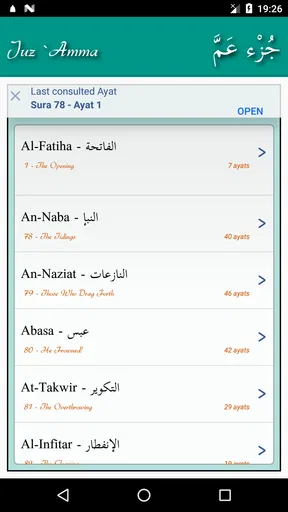
First things first, let’s talk about the user interface. The app has a clean and intuitive design, which makes navigation a breeze. You don’t need to be a tech wizard to find your way around. The moment you open it, you’re greeted with a calming layout that sets the tone for a peaceful reading experience.
Installation was a snap, and within moments I was scrolling through the various Suras. The app is available for both Android and iOS, so no one’s left out. Just a few taps and you’re good to go!
Diving Into the Features
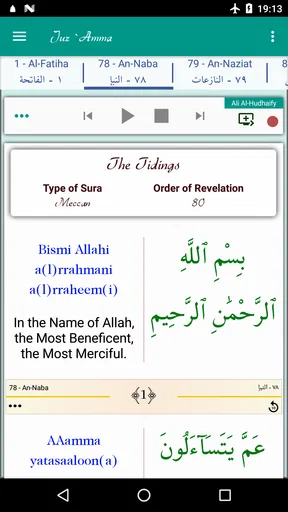
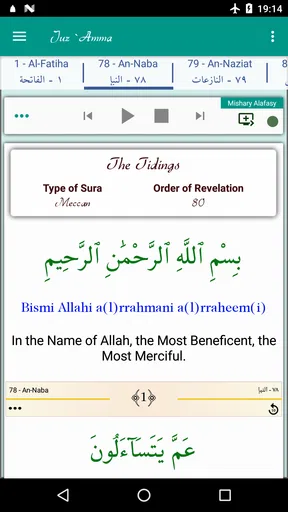
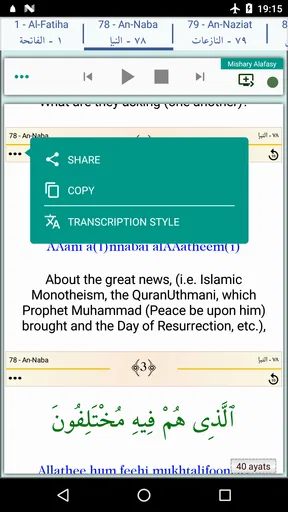
The Juz Amma (Suras of Quran) app is packed with features that cater to both beginners and seasoned readers of the Quran. One of the highlights is the audio recitation. You can listen to the Suras being recited beautifully, which is perfect for those moments when you want to absorb the teachings without reading.
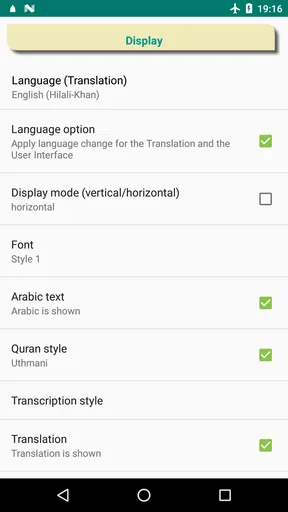
For readers who are still learning, the app offers translations in multiple languages. This feature is a game-changer. It allows you to understand the text at a deeper level, making your study more meaningful. Plus, there's a transliteration option that helps with pronunciation. Trust me, it feels like having a personal tutor in your pocket.
Why It Stands Out
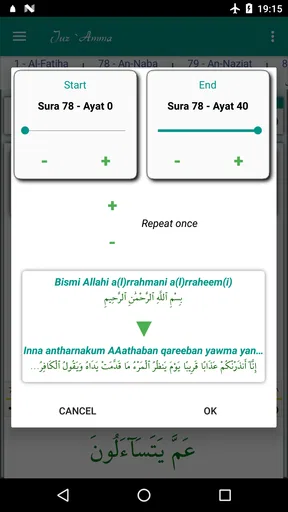
The app doesn’t just stop at providing the Suras. It goes a step further by including a search function. This is a lifesaver when you need to quickly find a specific verse or topic. And let’s not forget about the bookmarking feature. You can easily mark where you left off or save your favorite verses to revisit later.
Another standout feature is the night mode. If you're like me and enjoy reading at night, this feature is a blessing for your eyes. It reduces glare and makes late-night reading sessions much more comfortable.
User Experience and Accessibility
Accessibility is at the heart of this app. It’s designed to be inclusive, ensuring that everyone can benefit from it. The font size is adjustable, which is great for those who need a little extra help with readability. Plus, the developers seem committed to regular updates, which means the app is constantly improving.
For those concerned about data usage, the app works offline once it’s installed. This means you can access the information anytime, anywhere, without worrying about your data plan. Perfect for those moments when you’re out and about or just want to disconnect from the internet.
Everyday use and honest limits
For my own routine, I would keep the app in a predictable place on a shared device and use one bookmark as a practical “continue here” marker. That is more reliable than trying to remember which chapter or verse I reached during a busy day. If another household member uses the same device, they can still read independently, but it helps to say when you have changed the text size or left a passage open. This is simple coordination, not a substitute for separate user spaces.
The audio option is useful when my eyes are tired or when I want to listen rather than read, but it is not always the right choice in a crowded room. Likewise, translation can make a passage easier to approach, yet a translation is a reading aid and not the same as learning Arabic or studying a detailed commentary. I would use the app differently depending on the goal: listening for familiarity, transliteration for practice, and translation for a first pass at meaning.
One question a new user may have is whether the app can serve as a complete Quran reference. I would not choose it for that purpose: its appeal is the focused material named in its description, including Juz Amma and Surah Al-Fatiha. Another practical question is whether it can be used without a connection; it works offline after installation, which makes it handy for travel or a quiet room with poor reception. For a learner wondering whether it can replace instruction, my answer is no. It can make practice convenient, while a trusted teacher remains the better person to correct recitation and explain difficult points.
As an app in the Libraries & Demo category, it is a straightforward option rather than a social or lesson-based platform. It was released on February 18, 2012, is free, and is rated for Everyone. I would consider those details alongside the optional purchases, not as a reason to expect a particular depth of teaching. The strongest reason to install it is the chance to keep a specific set of chapters close at hand; if your needs extend well beyond that, compare it with a broader Quran reader before settling on a daily tool.
Final Thoughts
At the end of the day, Juz Amma (Suras of Quran) is more than just an app; it's a tool for personal growth and understanding. Whether you’re new to the Quran or have been a long-time reader, this app is sure to enhance your experience. Its user-friendly design, comprehensive features, and thoughtful details make it a must-have for anyone looking to deepen their spiritual path.
So, if you’re on the lookout for an app that seamlessly blends convenience with spiritual enrichment, give Juz Amma (Suras of Quran) a try. It’s like carrying a serene library in your pocket!
Pros
- Easy-to-use interface for quick navigation.
- Audio recitations available for better learning.
- Supports offline access for convenience.
- Includes multiple translations for clarity.
- Bookmark feature for tracking progress.
Cons
- Limited to only Juz Amma content.
- No interactive learning tools included.
- Occasional app crashes reported by users.
- Ads may interrupt user experience.
- Requires manual updates for new features.
FAQs for Juz Amma (Suras of Quran)
What is Juz Amma and what does it include?
Juz Amma refers to the 30th section of the Quran, which includes the last 37 surahs (chapters). It is commonly recited in daily prayers and is often the first part of the Quran that Muslims learn due to its shorter surahs. The app provides easy access to these surahs for reading and memorization.
Is Juz Amma suitable for beginners learning Quranic recitation?
Yes, Juz Amma is ideal for beginners due to its shorter surahs, which are easier to memorize and recite. The app typically includes features like audio recitations, translations, and transliterations to aid learning. These tools are designed to help users, especially those new to Quranic studies, improve their recitation skills.
Does the app offer translations and transliterations of the surahs?
Most Juz Amma apps provide translations and transliterations to cater to non-Arabic speakers. These features help users understand the meaning of the texts and pronounce Arabic words correctly. The availability of translations in multiple languages ensures a wider reach and better comprehension for a diverse user base.
Are there any interactive features in the Juz Amma app?
Many Juz Amma apps include interactive features such as audio recitations by various Qaris (reciters), progress tracking, and quizzes to test memorization. These features enhance the learning experience by allowing users to listen, repeat, and track their improvements over time, making the app more engaging.
Is the Juz Amma app free to use, and are there any in-app purchases?
While many Juz Amma apps are free to download, they may offer in-app purchases for additional features like enhanced audio quality, ad-free experiences, or additional reciter options. Users should check the app details to understand what is included for free and what might require a purchase.


